


- Home
- Reports
Reports & General Ledger
Every transaction posts to your books the moment it is saved — so every report is already up to date when you open it.
What the DFE requires
The registers and statements your permit depends on
The Department of Foreign Exchange's Operational Guide says a money changer's software must produce customer receipts, balance statements, a purchase register and monthly statements of deposits — for every outlet, on demand. Here is how FXSOFT covers each.
| The DFE requires | In FXSOFT | Where to find it |
|---|---|---|
| Serial-numbered customer receipts, in two copies | Receipts with your permit number, business details, customer NIC or passport, source of foreign currency, and each currency's rate; A4 dual-copy, A5 or 76 mm roll. | Invoices |
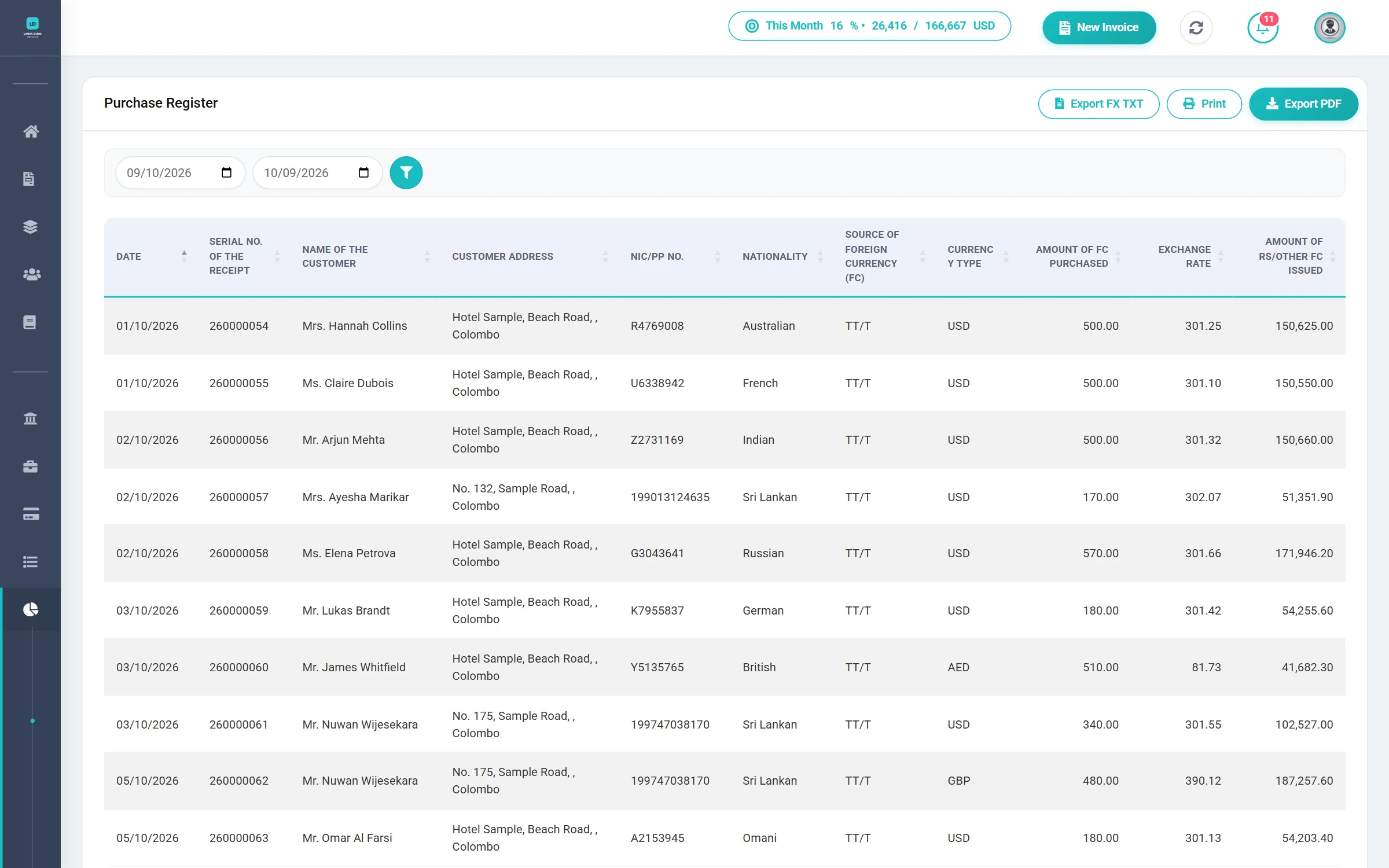
| Purchase Register | Date, receipt serial number, customer, NIC/passport, source of foreign currency, amount purchased, rate, rupees issued, nationality and address. | Reports → Purchase Register (screen and PDF) |
| Daily, monthly or periodic Balance Statement | Opening balance, purchases, deposits to the Authorized Dealer and closing balance for every currency, over any period. | Reports → Daily Balance Statement |
| Monthly Statement of Deposits of foreign currency | Deposits for the month by bank, ready to be confirmed by your Authorized Dealer. | Reports → Monthly Deposit Statement (PDF and Excel) |
| Daily reporting of purchases and deposits to the DFE | The day's transactions as a Central Bank-format TXT file, with a checksum on every record, ready to upload. | Reports → Purchase Register → FX TXT |
| Annual minimum deposit requirement for permit renewal | The USD value of every deposit tracked against your annual target. | Deposits |
| All of the above available on request, including on-site inspection | Any register or statement is a few clicks away, for any date range. | Reports |
Sources: Directions No. 01 of 2025 (paras. 9.5, 10.1, 10.3, 11.1) and the Operational Guide to Authorised Money Changers (§§3, 7.B, 7.C, 7.G). See the full Regulatory Guide.
The automated ledger
Your books keep themselves
No end-of-day posting, no month-end catch-up. The ledger is updated by the work your team already does.
Posts itself
Saving an invoice, deposit, withdrawal, or day-book entry updates the daily currency balances and the general ledger automatically.
Balances by currency
Opening and closing balances are rolled forward for every currency, every day, so you always know your position.
Rebuildable
If you ever need to, an administrator can rebuild the general ledger from the underlying transactions.
The report suite
The reports a money changer actually needs
Pick a date range or month, preview it on screen, and download it in the format you need.
| Report | What it shows | Download as |
|---|---|---|
| Daily Balance Statement | Opening and closing balances by currency across a date range. | |
| Monthly Deposit Statement | Deposits for a month by bank, with the amounts and totals. | PDFExcel |
| Purchase Register | Transactions in a period with customer, currency, rate, and Central Bank purpose codes. | PDFCentral Bank FX TXT |
| General Ledger | Daily debits, credits, and the balance brought forward and carried forward. | |
| Monthly Summary | A month-at-a-glance summary of your activity — pick any month. | |
| Monthly Purchases | Purchases for the month, ready for review or filing. | |
| Sales & Purchases Summary | Sales set against purchases for the period you choose. | |
| Sanction Logs | The screening history by day and by month, with matched and clear results. |
Your company details and logo appear on documents and reports, so everything you print is ready to hand over.
Day Book
Not everything is an invoice. Record income and expenses — rent, salaries, utilities, and the rest — in categories you control, and they post straight into the daily ledger alongside your transactions.
A dashboard that answers the first question of the day
- Today's invoices — how many, and the total value.
- Bank balances and today's deposits and withdrawals.
- The ledger balance, with today's debit and credit.
- New customers this month, and this month's sanction matches.
- Totals from the most recent scheduled sanction scan.
Ready to see FXSOFT in action?
Watching FXSOFT handle a real multi-currency invoice, an automatic sanction screen, and a Central Bank report in minutes says more than any brochure. Book a live demo and see exactly how much manual work you can hand off.