


- Home
- Compliance
Compliance, Built In — Not Bolted On
Sanction screening, Customer Due Diligence, and Central Bank reporting run inside the same system your team already uses for daily transactions — built around what the DFE and the FIU require.
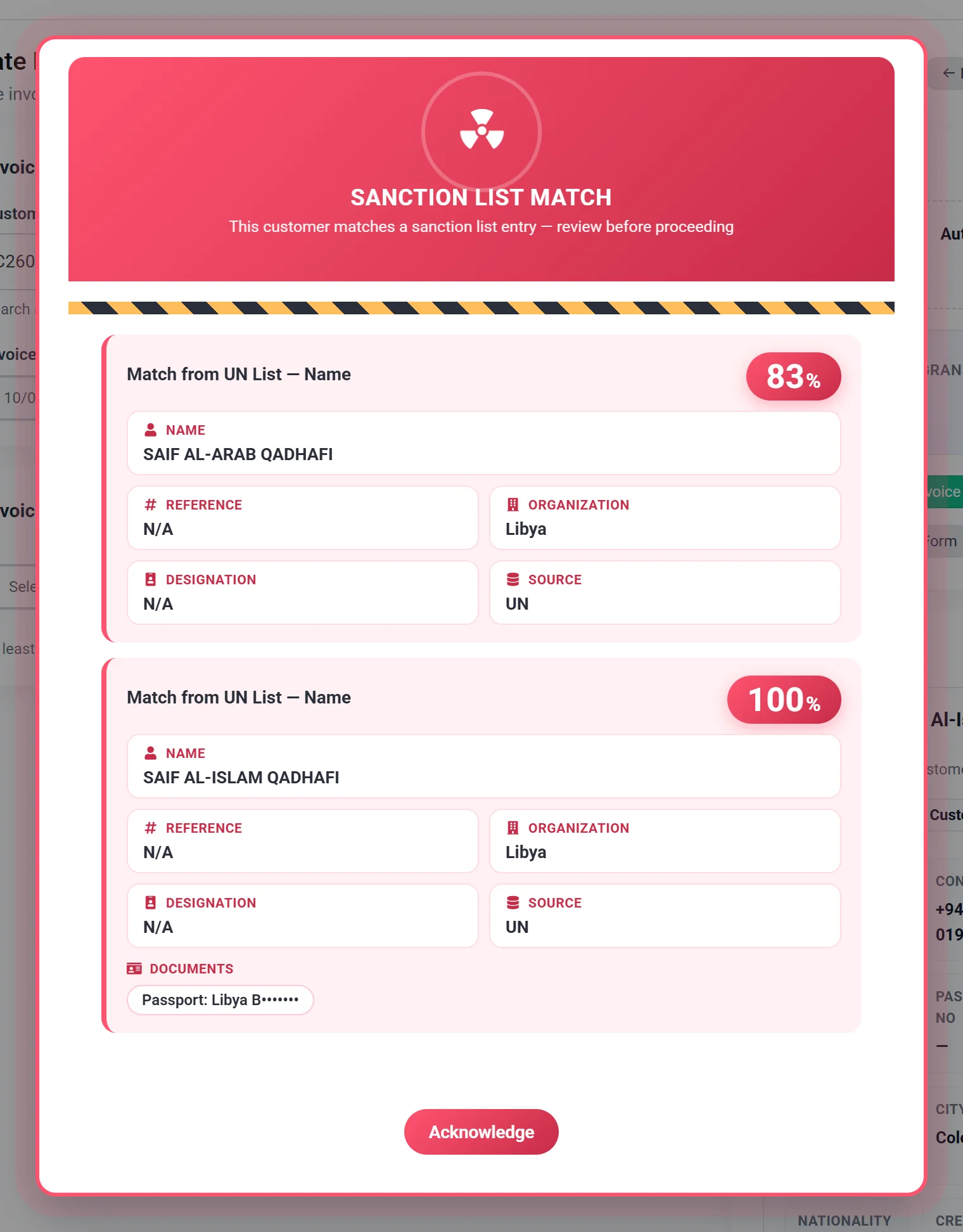
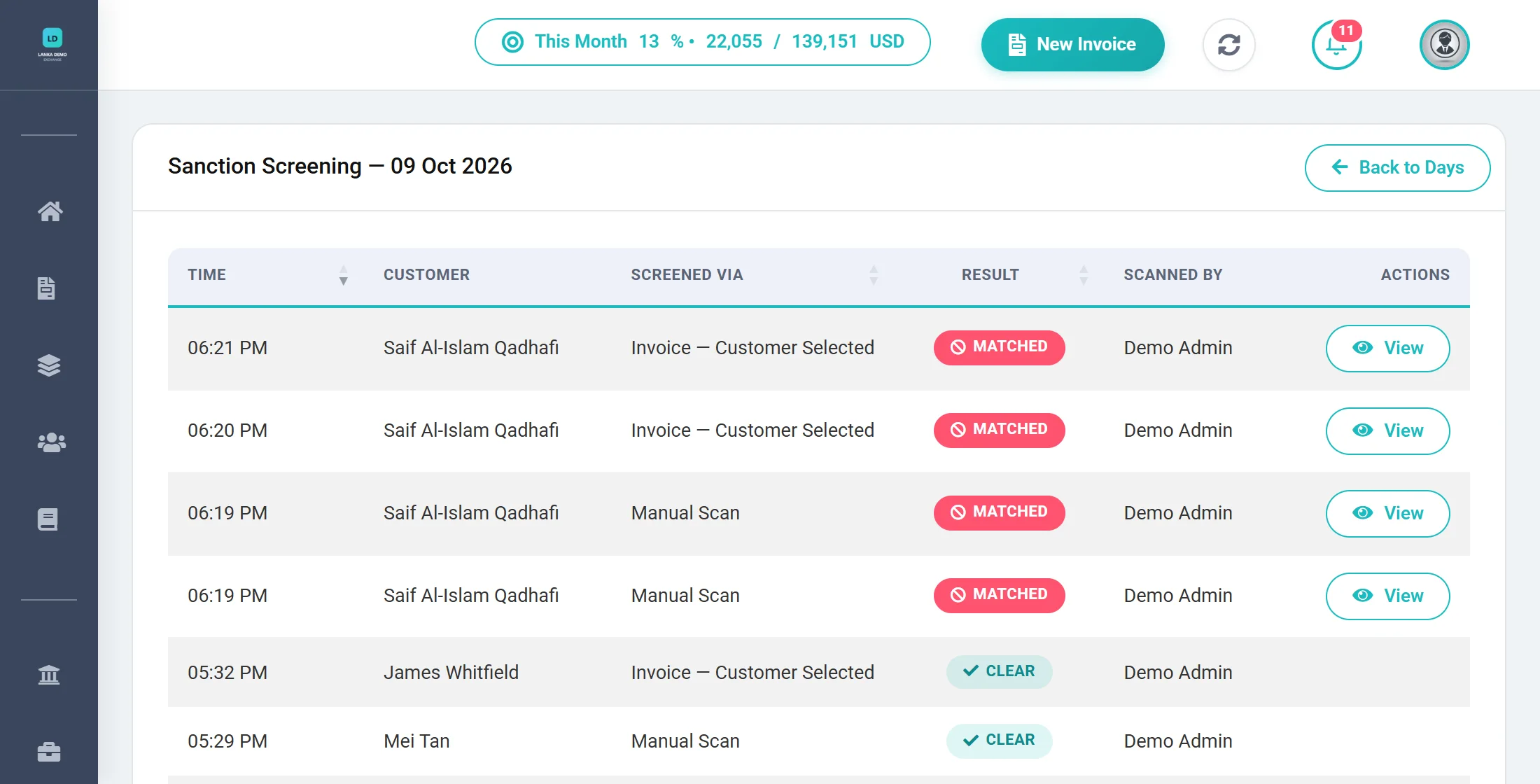
Demonstration data: the customer shown is a made-up record that uses the name of a person on the public UN consolidated list, to show what a match looks like. Identity numbers are masked.
Sanction screening
Two lists, kept current automatically
The FIU requires money changers to keep a current database of designated persons and to check customers against it before dealing with them (CDD Rules, rule 95; FIU Circular 01/2014). FXSOFT does the database part for you.
UN consolidated list
Customers are screened against individuals on the United Nations Security Council's consolidated sanctions list.
Sri Lanka 1373 list
And against Sri Lanka's own 1373 list of designated persons, published by the Competent Authority. Both are checked in the same scan, and the list that matched is recorded.
Refreshed every morning
Lists sync automatically each day at 7:00 AM Sri Lanka time, so you screen against current data.
Want to see exactly what you are screening against? The loaded list files can be viewed and downloaded from inside FXSOFT.
How matching works
Catch real matches without drowning in false alarms
Matching combines exact ID checks with careful name matching, so spelling variations are caught but coincidences are not flagged.
- ID numbers: NIC and passport numbers are normalised and matched exactly, so spacing or punctuation differences cannot hide a match.
- Names: fuzzy matching tolerates spelling variants and transliteration differences.
- Safeguards: a name match needs a strong overall score and at least two name parts that independently agree, which keeps common names from over-triggering.
- Single-word names are held to a stricter standard still.
- Every match is recorded with the list, the field that matched, and a match score for your compliance officer to review.
When screening happens
Screened at every touchpoint
Screening is not a step someone has to remember — it is triggered by the work itself.
| Trigger | What happens |
|---|---|
| New customer | The customer is screened as soon as they are added. |
| Customer edited | Editing a customer's details triggers a fresh scan. |
| Customer selected on an invoice | Screened again at the counter, right when the transaction starts. |
| Manual scan | Screen any single customer on demand. |
| Bulk scan | Screen your whole customer base in one run, with live progress. Run it whenever the lists change. |
| Monthly scheduled scan | On the 1st of every month, every customer is re-screened automatically — catching anyone who has been listed since they were last checked. |
| CDD beneficiary | When someone transacts on behalf of another person, that person is screened too. Their details are checked but never saved as a customer. |
Ahead of the quarterly cycle. In Circular 02/2026 (22 May 2026) the FIU asked financial institutions to screen their entire customer database against current sanctions lists and to repeat it at least quarterly, keeping records of the results. FXSOFT's automatic monthly re-screen and on-demand bulk scan are more frequent than that, and every result is logged.
Audit trail
Proof that you screened, and when
Every scan is logged, so an audit becomes a report you open — not a project you start.
Every scan logged
Date and time, what triggered the scan, and whether the result was clear or matched.
Daily & monthly views
Drill from a month down to a single day, with separate lists of matched and clear results.
Printable reports
Download the monthly screening report as a PDF to file or hand to an examiner.
On your dashboard
See this month's matches and the totals from the last scheduled run the moment you log in.
When there is a match. FXSOFT shows it straight away and logs it. What happens next is a decision for your compliance officer: under FIU Circular 01/2014 a money changer must not deal with a designated person, must inform the FIU within 24 hours, and must notify the Competent Authority.
Customer Due Diligence
CDD forms that fill in at the right moment
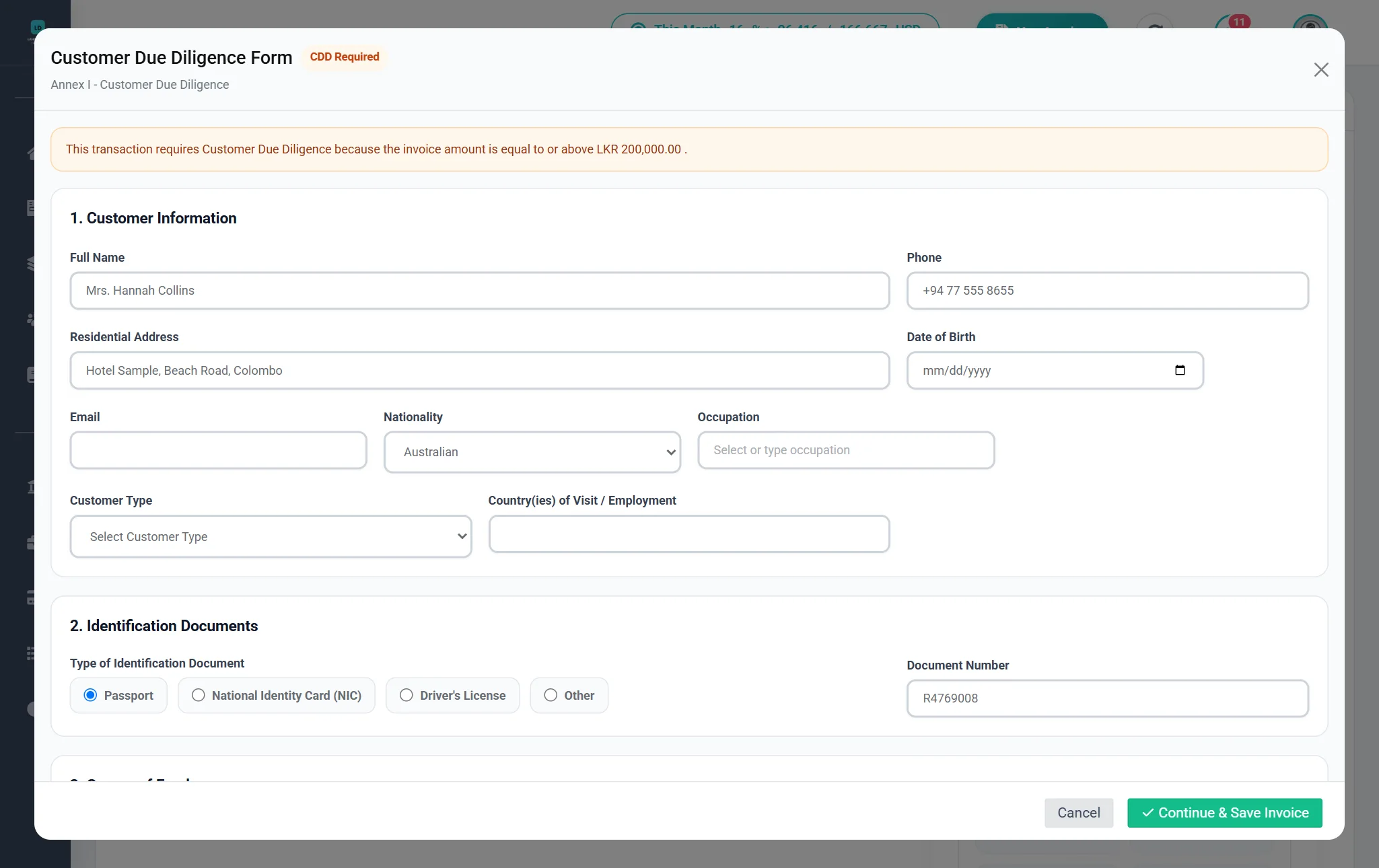
The FIU's CDD Rules require due diligence for money-changing transactions above Rs. 200,000, or the foreign-currency equivalent, including linked transactions. FXSOFT puts the form in front of your team exactly then.
- Triggered automatically by the invoice amount (the threshold is Rs. 200,000 by default and can be updated if the FIU changes it).
- Printed as a Customer Due Diligence form under the Financial Institutions (CDD) Rules, No. 1 of 2016, with your permit number and business details on it.
- Records the customer's occupation, the purpose of the transaction, the source of funds, and whether they are a politically exposed person.
- Captures transactions made on behalf of another person, and screens that person against the sanction lists.
- Completed by your staff and stored with the invoice, with the person who completed it recorded; print it straight after saving.
What the FIU is looking for
The gaps regulators have called out
In Circular 3/2024, the FIU told Restricted Dealers where it had found non-compliance. Here is how those areas map to FXSOFT.
| Area the FIU named | In FXSOFT |
|---|---|
| Obtaining a copy of the customer's identification document | Built in Upload and keep copies of the NIC, passport and driving licence on each customer profile. |
| Targeted financial sanctions screening | Built in UN and 1373 screening at every touchpoint, with a full audit trail. |
| Record keeping | Supports Transactions, ID copies, CDD forms and screening logs are stored in your own workspace and retrievable on demand. |
| Enhanced due diligence on politically exposed persons | Supports PEP status and source of funds are recorded on the CDD form; enhanced measures follow your policy. |
| Suspicious transaction reporting, AML/CFT policies, training, risk management, internal controls | Your process These are duties of your business; FXSOFT's records support them. |
See every requirement, with its source, in the Regulatory Guide for Authorized Money Changers.
Central Bank reporting
The Department of Foreign Exchange's reports, generated for you
The DFE's Directions No. 01 of 2025 require every transaction to be recorded in software that can produce your registers and statements, and purchases and deposits to be reported daily. FXSOFT prepares all of it.
Purpose codes on every invoice
Central Bank purpose and sub-purpose codes are captured per invoice, from a shared list kept current for all businesses.
The daily FX TXT file
Choose a date or date range and download your transactions as a Central Bank-format TXT file: a header record with the timestamp and record count, then one line per transaction with customer ID, purpose codes, and each currency's rate and amount.
Built-in integrity check
Every record carries a checksum, and the file is named with your institute code and the date.
Purchase Register & Balance Statement
The registers and statements the DFE's Operational Guide lists, available for any date range as soon as you need to show them.
Monthly deposit statement
The statement of foreign currency deposits, per bank, as a PDF or Excel file, ready to be confirmed by your Authorized Dealer and sent to the DFE.
Annual deposit target
Track the USD value of every deposit against your annual deposit requirement for permit renewal.
See all reports on the Reports page, or read the full Regulatory Guide.
Related reading: Regulatory Guide · Licence guide · Glossary · FAQ
Ready to see FXSOFT in action?
Watching FXSOFT handle a real multi-currency invoice, an automatic sanction screen, and a Central Bank report in minutes says more than any brochure. Book a live demo and see exactly how much manual work you can hand off.